




Increased voice volume for radio communication;
Reduced background noise for radio communication;
Increased radio communication range to 35 km;
Reduced database load. Frequently accessed commander data is now cached and retrieved from memory, preventing database overload with queries;
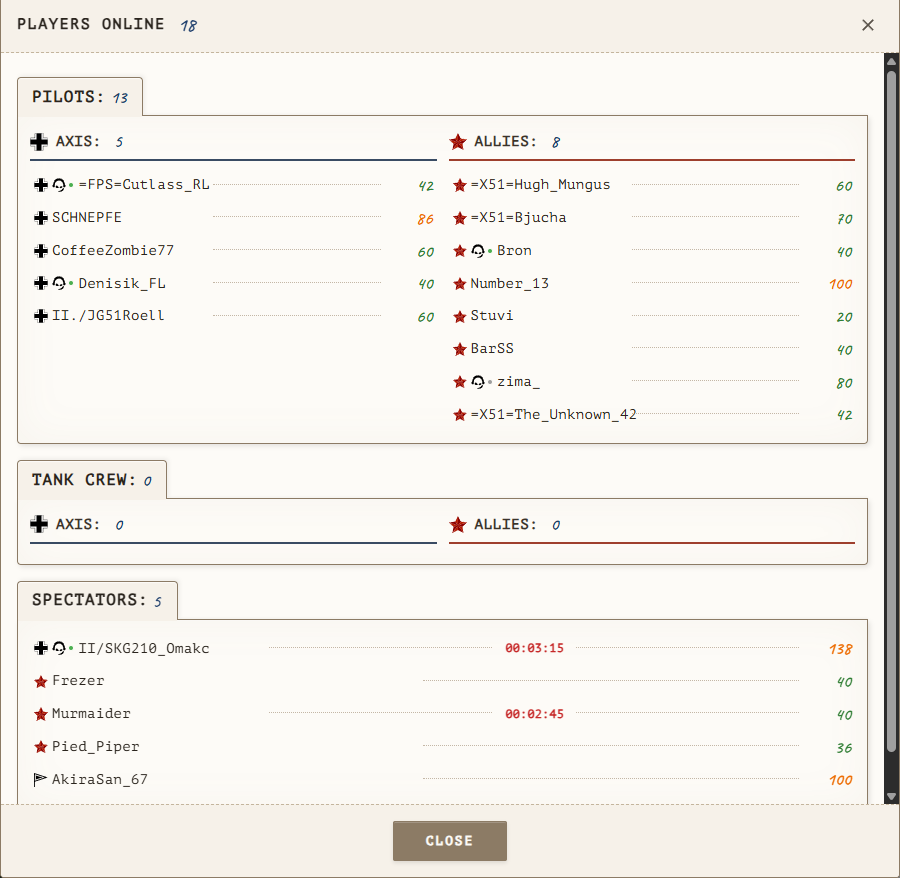
Added icons to the player online window indicating if a user is on the TeamSpeak server, as well as their status (online/offline);
Added a countdown timer and penalty reasons to the player online window. If a character is captured or killed, a timer will tick down showing the remaining time until combat actions are permitted;
Emergency landing at an airfield should now deduct three times less in-game currency (let's test this together);
The "Bridge" objective is now considered destroyed when 65% of all its objects are destroyed;
The logger bot now sees everyone on the TeamSpeak server, records multiple events, and tracks user statuses (online, mic on/off, sound on/off). In the future, we will add TeamSpeak server monitoring to the website so you can see who is in which channel;
Fixed a bug where negative values were added to a group, reducing the overall income;
Fixed other minor bugs;
Partial code refactoring;
Happy flying!
Create an account or sign in to leave a review
There are no reviews to display.